
The morning screen
Home is written for a first-time reader and for a thirty-second check each morning. It answers its questions top to bottom.

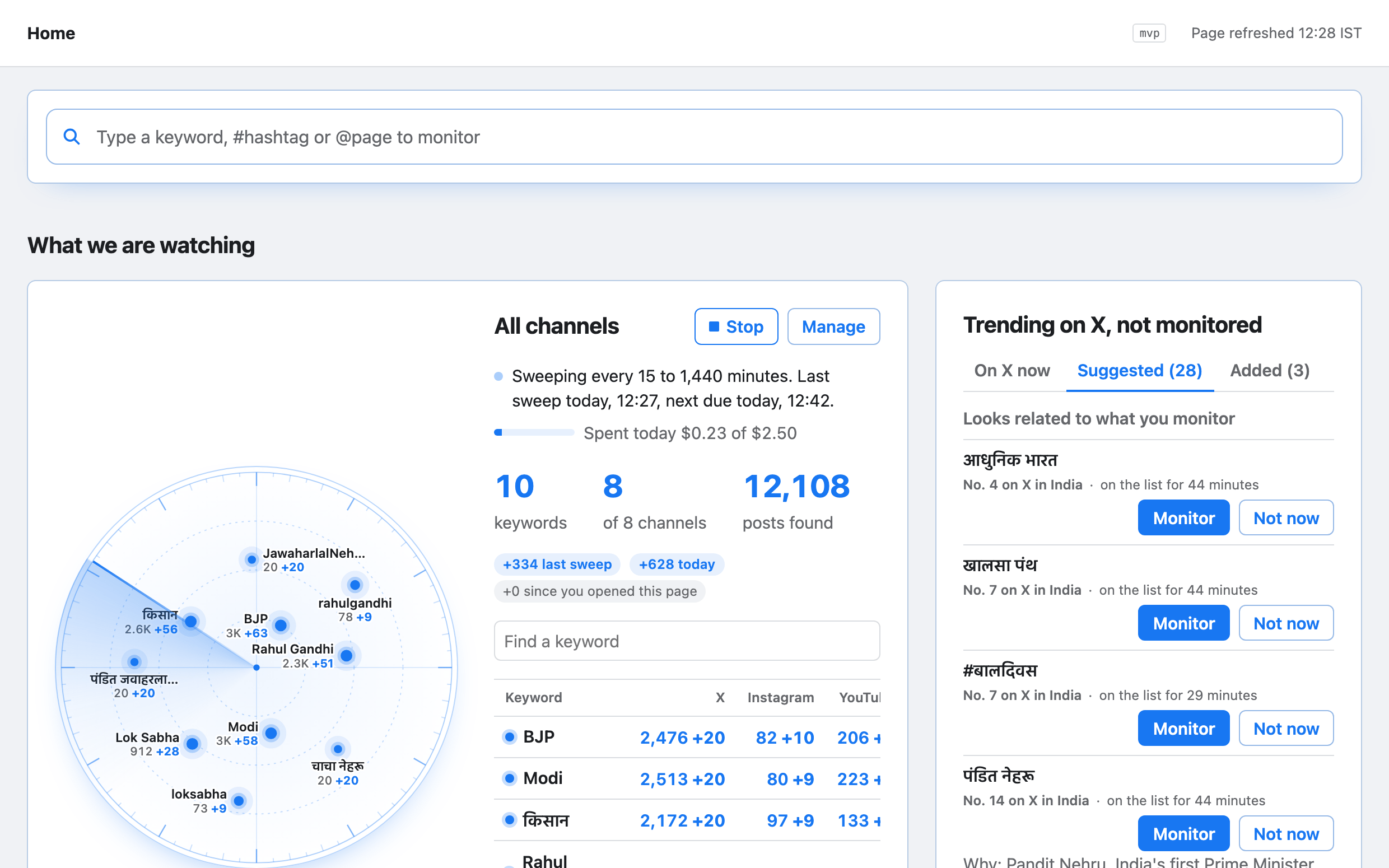
01
What we are watching
Every watched keyword, how often it is checked and how many posts it has found, for all channels and for each one.
02
AI citation
What AI assistants say when asked about your keywords, and the websites they point to.
03
What people are talking about
Posts every 15 minutes by topic on one chart, then a card for each topic with its numbers.
04
Media to check
Items waiting for a person, with what the checks found and how long each has waited.
05
Is the system working
Whether posts are arriving, said in a sentence, and what to do when they are not.
Twenty screens, five jobs
Each screen does one job. They are grouped here by the job they serve.
| Job | Screen | What it is for |
|---|---|---|
| Watch | Home | The morning check: what is watched, what is rising and what needs checking |
| Watch | Timeline | Every active topic on one time line, with its forecast for the next hour |
| Watch | Trends | Topics rising now, by platform and by state |
| Watch | Search | Posts, accounts and clusters by text, handle, date, state or verdict |
| Understand | Topic | One topic: its trend, forecast, stance and coordination together |
| Understand | Forecast | The forecast for a topic, with its range and the reasons behind it |
| Understand | Clusters | Items seen many times, with copies by platform and where each was first seen |
| Understand | Cluster | One item: its spread over time and every place it appeared |
| Understand | Accounts | The accounts most active on a topic, with their reach and history |
| Examine | Review | The queue of media verdicts waiting for an analyst |
| Examine | Media | One media item: the verdict, the six checks and the evidence |
| Examine | Cases | The incidents your team is working, each linking topics, items and verdicts |
| Examine | Case | One incident, with its evidence pack and the response taken |
| Act | Flags | Every rule that fired, on what, with the value and the window |
| Act | Rules | The conditions that raise flags, with how often each fired and how useful it was |
| Act | Rule | Write a rule and try it on the last seven days before it goes live |
| Act | Engagement | Drafts and approvals of replies from your official accounts |
| Act | Reports | Briefings, daily reports and corrections, with their approval |
| Run | Watchlist | Keywords, hashtags, accounts and topics to watch, with the cost shown before import |
| Run | Health | Whether every source and service is working, spend against budget, and retention |
Written in plain words
The first screen is written for someone who has never opened the tool. No field name, record name or internal code appears on it.
On it, every number carries its unit and what it is compared with, in the same sentence. A count of posts says over which period; a rise says against which usual level.
Times are in Indian Standard Time, written as a date and a time, with today or yesterday where that is true.
On Home, an empty or stopped panel says why, in a sentence, and what to do next. It is never left blank.
Five roles
| Role | What it may do |
|---|---|
| Analyst | Reviews verdicts, labels items, drafts replies, opens cases and edits the watch list. |
| Approver | Approves replies and releases external reports. Makes changes to protected settings, which a second person then acknowledges. Required to sign in with two factors. |
| Policy owner | Writes and tests rules, and changes the watch list and the other settings. |
| Admin | Labels items, works on and closes cases, changes the watch list and collection, writes and tries rules, drafts replies and releases external reports. Does not approve or send replies, and in production changes no settings, unless also holding the approver or policy owner role; changing sign-in settings there is a protected change, made by an approver with a second person’s acknowledgement. Required to sign in with two factors. |
| Viewer | Reads screens and reports, including the health screen, and changes nothing. |
Empty. Stale. Partial.
1. Empty: the body is empty, and the header and filters stay in place.
2. Stale: once the data is older than the view allows, its time stamp changes colour. Nothing else on the panel moves.
3. Partial: the rows or columns affected carry a status mark, and the rest of the panel still shows.
The working screens show no banner and no pop-up. Every one of them shows these three states the same way.
See the morning screen and the twenty screens behind it in a demonstration.
Request a demo/platform/console · The console