
Rising. About the same. Falling.
For each topic busy enough to call, the next hour is read as one of three directions against the last hour. Rising means at least one and a half times the last hour’s posts; falling means two thirds or fewer; anything between is about the same.
On screen each reads as a likelihood: "likely rising", "likely about the same", "likely falling".
The next hour
A forecast reads the topic up to now and looks one hour ahead.

01
Up to now
How fast posts are growing and accelerating over the last 5, 15 and 30 minutes, the number of different accounts posting, pickup by influential accounts, spread across platforms, engagement, the mix of opinion, the latest coordination reading and the time of day.
02
The hour ahead
How likely each of the three directions is. The dashed line is the last hour’s level carried forward by the expected change.
03
The reason
What pushed the forecast up and what held it back, each written as a sentence.
04
Too small to call
A topic with fewer than 20 posts in the last hour gets no forecast, and the screen says so with the number: "Next hour: no forecast, under 20 posts in the last hour."
What a forecast contains
01
Direction
Rising, about the same or falling, with how likely each is.
02
The chance of passing 500 posts in the hour
A separate line with a fixed meaning, for alerts. It is never read as a direction.
03
A range
Drawn as a band around the expected level on the topic’s lane in Timeline.
04
The reason in a sentence
The features that moved it most, in plain words.
On the screen
The Forecast screen answers, in order: what is about to get bigger in the next hour, how sure that is, why, and why most topics have no forecast.

The Forecast screen at 12:42 IST on 14 Nov: for each watched keyword, last hour’s posts against the expected next hour, the direction in words and how sure each forecast is, marked “not yet checked”; picking “Why” on a keyword highlights it.
01
Last hour and the hour ahead
For each topic forecast, two bars on one scale: posts in the last hour and the expected next hour, with the direction in words.
02
How sure
One bar per topic split into rising, about the same and falling.
03
Why
The reasons as sentences, each with a bar for how far it pushes up or holds back.
04
How busy topics are
Topics grouped by posts in the last hour, against the line of 20 that a forecast needs.
05
All the numbers
The full tables for analysts, one click away.
"Not yet checked"
Forecasts carry the words "not yet checked" until they have been validated against what happened. Each forecast is scored once its hour has passed: the actual posts, the actual direction and whether 500 was reached are written onto the same record, and those records are the track record that validation uses.
Until then, any figure beside a forecast is the model’s own estimate and is marked as such. It is not presented as a measured probability.
A forecast becomes a probability with a range only after calibration on your own data, which needs at least three weeks of history and at least 100 cases in which the forecast outcome happened.
Forecasts can first run in the background: made, stored and scored, but not shown, so that a track record exists before anyone relies on them.
For each keyword you watch
A watched keyword is spread over many small topics. So each keyword also gets its own forecast line, with all its posts on every channel counted together.
Each line has the same two bars, the same direction words and the same "how sure" bar as a topic. A keyword below the line says how close it is: "Too quiet to forecast. 11 of 20 posts in the last hour."
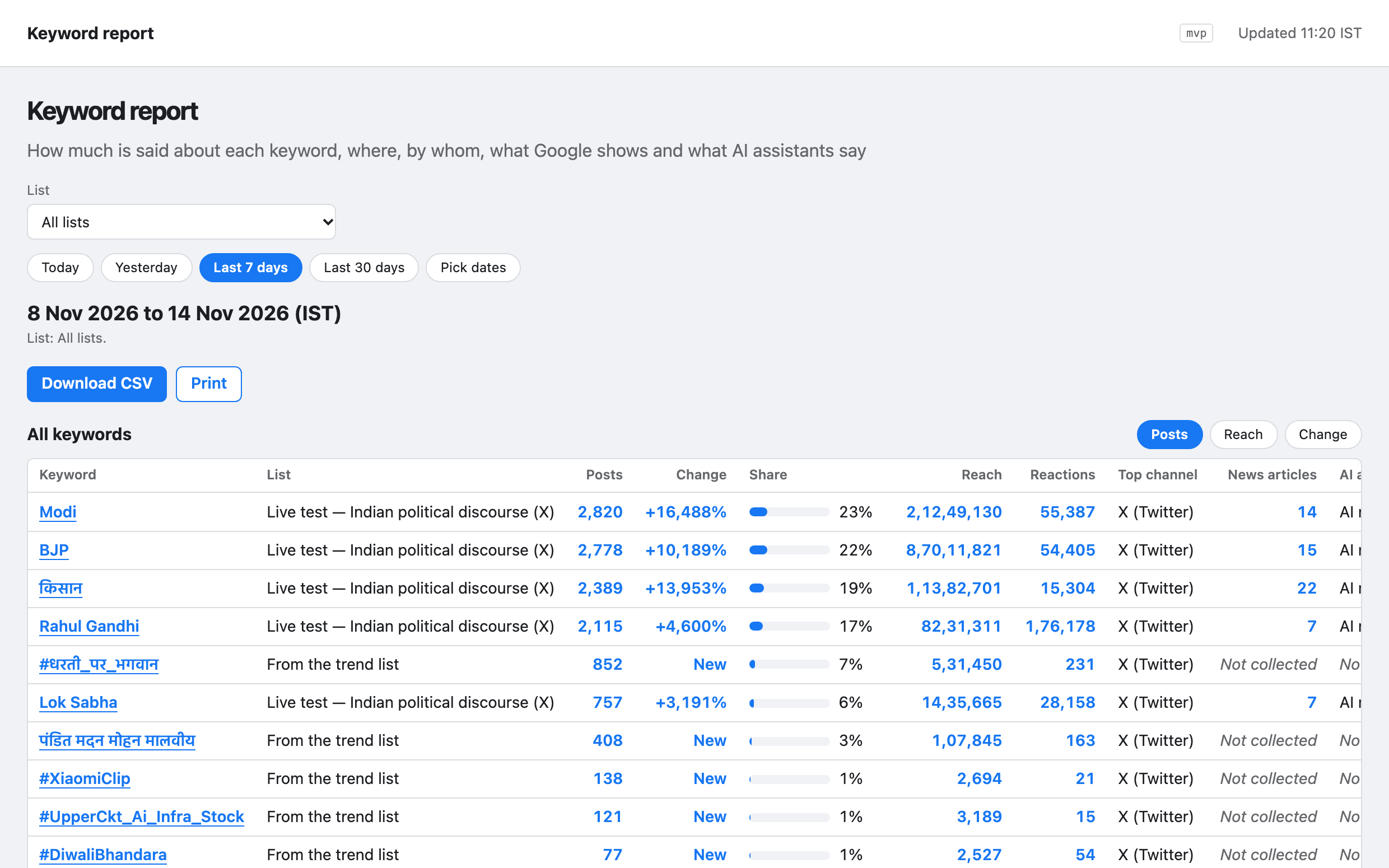
The keyword’s name opens its report: posts and articles against the period before, which channels carry it, the posts and accounts with the most reach, the news publishers, what a web search shows and which websites AI assistants cite. It downloads as a file and prints as a page.

Questions
How far ahead does it look?
One hour, for topics and for each watched keyword.
How reliable is it?
That is measured on your own data. Each forecast is scored once its hour has passed, and until calibration has passed it is marked "not yet checked".
Why do most topics have no forecast?
A forecast needs at least 20 posts in the last hour. Most topics are quieter than that, and the screen shows how many are just under the line.
Can a forecast raise an alert?
Yes. A rule can be written on a forecast, for example on the chance of passing 500 posts. A rule written on a probability does not fire while the forecast has no calibrated probability.
See the next-hour forecasts for the topics and keywords your team already watches.
Request a demo/platform/forecasts · Forecasts